The End of an Era: Create React App is Dead - What's Next for React Developers?
For nearly a decade, Create React App (CRA) was the go-to tool for bootstrapping React projects. Launched in 2016 by Facebook, it democratized React development with its zero-configuration setup, making it a favorite for beginners and seasoned devs alike. But as of early 2025, the React team has officially marked CRA as deprecated for new projects, signaling a shift toward more modern, performant alternatives. In this detailed guide, we'll unpack why CRA is “dead,” what this means for your workflow, and explore the best replacements—complete with pros, cons, comparisons to CRA, and real-world examples. Whether you're a CRA loyalist or ready for a fresh start, this post has you covered.
Why is Create React App “Dead”?
CRA's deprecation isn't a surprise—it's been on life support for years. The React team's official announcement on February 14, 2025, confirmed its retirement, citing evolving needs in the web development landscape. Here's a deeper look at why CRA no longer cuts it:
- Performance Bottlenecks: CRA uses Webpack 4 and Babel under the hood, which lag behind newer tools. Build times balloon as projects grow, with cold starts and Hot Module Replacement (HMR) feeling sluggish compared to modern alternatives.
- Outdated Features: CRA lacks native support for server-side rendering (SSR), static site generation (SSG), or file-based routing—features now table stakes in frameworks like Next.js. It's stuck in a single-page app (SPA) mindset.
- Maintenance Stagnation: The last major update (v5.0.1) in April 2022 left CRA trailing React 18's advancements, like concurrent rendering. Community forks like craco tried to patch the gaps, but the core tool couldn't keep up.
- Eject Pain: Customization meant ejecting, exposing a tangled Webpack config that intimidated newcomers and frustrated pros. Even then, you were stuck with outdated defaults.
- Ecosystem Shift: Tools like Vite, esbuild, and SWC have redefined build performance, while frameworks like Remix and Astro push React into new territories—leaving CRA in the dust.
The React team now recommends moving to frameworks (e.g., Next.js, Remix) or custom setups with modern bundlers (e.g., Vite). While CRA still runs, it's a relic—unsupported for new projects and a liability for scaling teams.
What Should You Choose Instead?
The React ecosystem is bursting with options, from lightweight bundlers to full-stack frameworks. Below, we've dissected the top CRA alternatives with technical details, trade-offs, and practical guidance. Each section includes a comparison to CRA, pros and cons, and a sample setup to get you started.
Vite + React
Vite, created by Evan You of Vue.js fame, is a next-gen build tool that leverages native ES modules and esbuild for unparalleled speed. It's the closest spiritual successor to CRA for SPA lovers.
- Lightning-Fast Builds: Esbuild's Go-based engine compiles code up to 100x faster than Webpack. A 1,000-file project might build in seconds, not minutes.
- Zero Config: Like CRA, it works out of the box with sensible defaults—run one command and start coding.
- Modern Features: Supports TypeScript, JSX, CSS modules, and PostCSS natively, plus a plugin system for extensions (e.g., vite-plugin-svgr for SVGs).
- Dev Server: Uses native ES modules for instant HMR, cutting reload times to milliseconds.
- SPA Focus: No built-in SSR or SSG—pair it with tools like Vitest or a backend for advanced use cases.
- Young Ecosystem: While adoption is soaring (over 2 million weekly downloads on npm), it's less battle-tested than Webpack for edge cases.
Vite mirrors CRA's simplicity but swaps Webpack for esbuild and native ES modules. It's ideal if you want CRA's workflow with a 2025 upgrade—faster, leaner, and less bloated.
A real-time dashboard SPA with frequent dev iterations.
        npm create vite@latest my-vite-app -- --template react-ts
        cd my-vite-app
        npm install
        npm run dev
Tip: Add vite-plugin-react for React Fast Refresh, mimicking CRA's live reload.
Next.js
Next.js, maintained by Vercel, is a powerhouse that extends React into a full-stack framework. It's the React team's top pick for most use cases.
- Rendering Options: Supports SSR, SSG, Incremental Static Regeneration (ISR), and client-side rendering—flexible for any app.
- File-Based Routing: Drop a file in pages/ (e.g., about.js), and it's a route—no extra config needed.
- API Routes: Build backend endpoints in pages/api/—perfect for prototyping or small apps.
- Optimized: Automatic code splitting, image optimization, and prefetching boost performance.
- Learning Curve: Concepts like getServerSideProps and getStaticProps take time to master.
- Vercel Bias: While deployable anywhere, it's tightly coupled to Vercel's ecosystem, which may lock you in.
Next.js is CRA with ambition—it keeps React's core but adds server-side muscle and opinions. If CRA's SPA limits held you back, Next.js opens the door to enterprise-grade apps.
An SEO-heavy e-commerce site with dynamic product listings.
        npx create-next-app@latest my-next-app --typescript
        cd my-next-app
        npm run dev
Tip: Use next.config.js to tweak Webpack or add SWC for even faster builds.
Remix
Remix, acquired by Shopify in 2022, is a modern framework emphasizing nested routing and data-driven development.
- Nested Routing: Routes like /dashboard/settings can render nested UI without prop drilling.
- Data Loaders: Server-side loader functions sync data with UI, reducing over-fetching.
- Progressive Enhancement: Works without client-side JS, falling back gracefully.
- Small Runtime: Ships less JS than Next.js, prioritizing performance.
- Newer Player: Launched in 2021, it has fewer third-party integrations than Next.js.
- Setup Overhead: Requires more upfront planning for data flows and routing.
Remix ditches CRA's SPA-only approach for a full-stack mindset. It's less “plug-and-play” but rewards devs with complex UI needs.
A SaaS app with nested dashboards and real-time updates.
        npx create-remix@latest my-remix-app --typescript
        cd my-remix-app
        npm run dev
Tip: Pair with Cloudflare Workers for edge deployment.
Gatsby
Gatsby uses React and GraphQL to generate blazing-fast static sites, perfect for content-driven projects.
- Pre-Rendering: Generates HTML at build time for instant page loads and SEO wins.
- GraphQL Data Layer: Pulls data from CMSs, APIs, or files into a unified query system.
- Plugins Galore: Over 2,500 plugins (e.g., gatsby-plugin-image) simplify integrations.
- Hosting Ease: Deploys to Netlify or GitHub Pages with zero server management.
- Build Times: Large sites with thousands of pages can take minutes to compile.
- Dynamic Limits: Real-time features require workarounds like client-side fetching.
Gatsby trades CRA's SPA flexibility for static-site supremacy. It's heavier but excels where performance and content reign.
A documentation portal with 100+ pages.
        npx gatsby new my-gatsby-site https://github.com/gatsbyjs/gatsby-starter-default
        cd my-gatsby-site
        npm run develop
Tip: Use gatsby-source-filesystem to pull Markdown content.
Astro
Astro is a hybrid tool that blends static generation with optional client-side React (or other frameworks) via its “islands” architecture.
- Minimal JS: Ships zero JS by default, adding it only where interactivity is needed.
- Multi-Framework: Mix React, Vue, or Svelte in one project.
- Fast Builds: Eschews heavy runtimes for a lean, Vite-based pipeline.
- Markdown Support: Built-in for blogs or docs.
- React Lite: React is an add-on, not the core—less idiomatic than CRA.
- Evolving: Launched in 2021, it's still maturing with fewer resources.
Astro is CRA's performance-obsessed sibling—static-first with React as a guest star. It's a departure but a dream for speed freaks.
A portfolio site with a React contact form.
        npm create astro@latest my-astro-site -- --template with-typescript
        cd my-astro-site
        npm install @astrojs/react
        npm run dev
Tip: Add @astrojs/vercel for seamless deployment.
Parcel
Parcel is a bundler that promises true zero-configuration, competing with Vite for simplicity.
- No Setup: Works with React, CSS, and assets without a config file—just point it at your index.html.
- Fast Enough: Uses multicore processing for builds, rivaling Vite in many cases.
- Tree Shaking: Built-in code optimization slims down bundles.
- Feature-Light: Lacks advanced optimizations of Webpack or esbuild.
- Niche Use: Less popular than Vite, with a smaller plugin ecosystem.
Parcel is CRA minus the cruft—simpler and faster but not as extensible. It's a quick-start champ.
A weekend hackathon project.
      mkdir my-parcel-app
      cd my-parcel-app
      npm init -y
      npm install react react-dom parcel
      echo '<div id="root"></div>' > index.html
      npx parcel index.html
Tip: Add a .babelrc for custom transforms.
Nx
Nx is a build system for monorepos but doubles as a standalone React setup with advanced features.
- Monorepo Magic: Manage multiple apps and libraries in one repo with dependency graphing.
- Caching: Speeds up builds and tests by reusing prior results.
- Tooling: Integrates Vite, Webpack, or esbuild—your choice.
- CI/CD Ready: Built-in support for large teams and pipelines.
- Complexity: Overwhelming for solo devs or small apps.
- Setup Time: Requires planning for workspace structure.
Nx is CRA for the big leagues—structured and scalable but not beginner-friendly.
A suite of micro-frontends for a fintech platform.
      npx create-nx-workspace@latest my-nx-app --preset=react --bundler=vite
      cd my-nx-app
      npm start
Tip: Use nx affected to run tasks only on changed projects.
Rspack
Rspack is a high-performance bundler written in Rust, designed as a drop-in replacement for Webpack with a focus on speed.
- Insane Speed: Rust compilation outpaces Webpack by orders of magnitude—think sub-second builds.
- Webpack Compatibility: Supports most Webpack loaders and plugins, easing migration from CRA.
- Modern Defaults: TypeScript, JSX, and CSS modules work natively.
- Active Development: Backed by ByteDance, it's evolving rapidly.
- Early Days: Launched in 2023, it's less mature than Vite or Next.js, with sparse documentation.
- SPA-Centric: No SSR/SSG out of the box—pair it with a server for advanced needs.
Rspack is CRA with a Rust engine—familiar Webpack vibes but turbocharged. It's a sleeper hit for SPA diehards.
A legacy CRA app needing a performance boost.
      npm create rspack@latest my-rspack-app --template react-ts
      cd my-rspack-app
      npm run dev
Tip: Reuse your webpack.config.js with minimal tweaks.
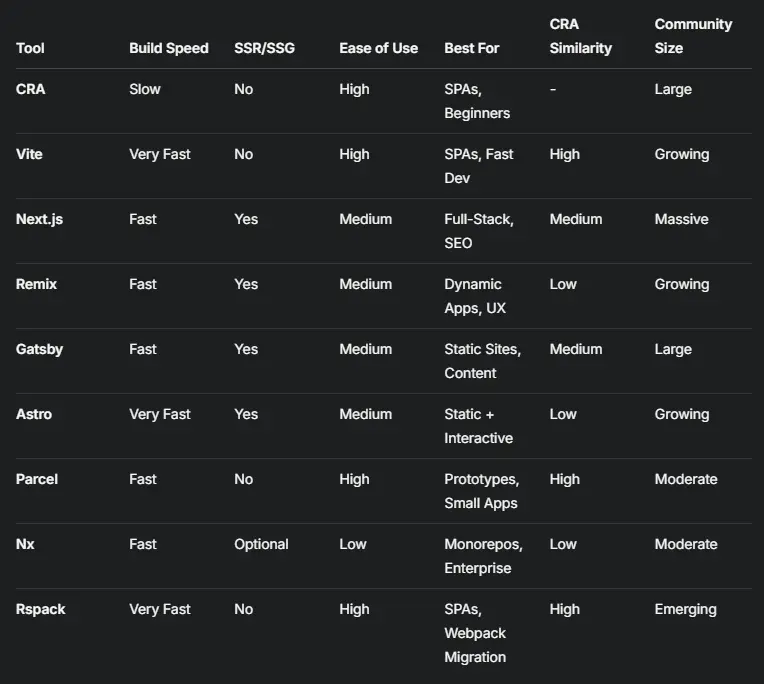
Which Should You Pick?
- CRA Fans Seeking Simplicity: Vite, Parcel, or Rspack keep the zero-config SPA spirit with modern speed.
- Full-Stack Ambitions: Next.js or Remix deliver SSR, routing, and data handling for dynamic apps.
- Static Site Gurus: Gatsby or Astro optimize for content and performance.
- Enterprise Scale: Nx structures large teams and monorepos with precision.
Migrating from CRA: Tips and Tricks
- Audit Your Setup: Check for custom Webpack configs or ejected setups—tools like Rspack or Nx ease the transition.
- Test Performance: Benchmark build times with Vite or Rspack against CRA to quantify gains.
- Start Small: Prototype with Parcel or Vite before committing to Next.js or Remix for complex apps.
- Leverage Plugins: Most alternatives support CRA staples like react-scripts polyfills via plugins.
Final Thoughts
Create React App's retirement closes a chapter, but the React ecosystem is thriving with innovation. From Vite's blistering speed to Next.js's full-stack prowess, there's a tool for every developer—whether you're building a quick SPA, a content empire, or an enterprise monorepo. The shift away from CRA is a chance to rethink your workflow, boost performance, and embrace the future of React.
What's your next move? Drop a comment with your favorite alternative or project plans—I'd love to hear how you're adapting!